Technical SEO is making sure Google can reach your pages, read them and tell them apart. For most small business websites, a handful of checks covers it.
This is where most of the jargon lives, and where most of the alarming audit reports come from. The job is simpler than it looks, and you can hand most of it to whoever looks after your website, as long as you know what to ask.
Can Google reach your pages?
A page that’s blocked from Google, or that nothing links to, may never be found.
Two settings cause most accidents:
- robots.txt is a file that tells search engines which parts of a site to stay out of. Google says it’s mainly for managing crawler traffic, and that it isn’t a way to keep a page out of Google.Google says[1]
- noindex is a tag on a page that tells Google not to show it in results. Google recommends this, or password protection, when a page really must stay out.[1]
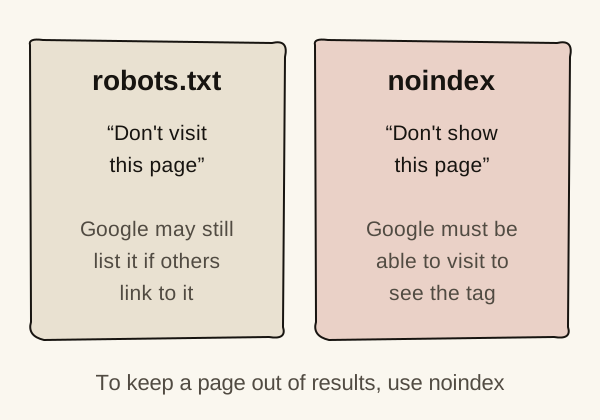
The two can work against each other. If you block a page in robots.txt, Google can’t visit it, so it never sees a noindex tag on it. Google says the page can then still appear in results, for example if other pages link to it.Google says[5]
A common accident is a new website that launches with a setting such as WordPress’s “Discourage search engines” still switched on from testing. It’s worth checking after any rebuild.
What about sitemaps? They help Google discover pages, but Google says a sitemap doesn’t guarantee every page will be crawled and stored. It also says a site of about 500 pages or fewer, with good links between its pages, may not need one.Google says[2] Most websites set one up anyway, and that’s fine.
Can Google read what’s on them?
Google needs to see your main content in the page itself, not locked inside images, logins or things that only appear after a click.
Many modern websites build pages with JavaScript, code that runs in the browser. Google can handle it, but it processes these pages in three phases: crawling, rendering (running the code to see the finished page) and indexing.Google says[3] Google still calls server-side rendering or pre-rendering, where the finished page is built before it’s sent, a great idea, because it’s faster for both people and search engines.[3]
You don’t need to know how your site is built. You just need important words to be real text on the page. Watch for:
- prices or service details that only exist inside an image
- content hidden behind tabs that load only when clicked
- a PDF brochure as the only place a service is described
How much does speed matter?
Speed matters most because slow pages lose visitors. It also plays a part in Google’s rankings, but relevance comes first.
Core Web Vitals are Google’s measures of how quickly a page loads, how soon it responds when tapped, and how stable it stays while loading. Google says its ranking systems use them.Google says[4] It also says it always tries to show the most relevant content, even if the page experience isn’t great.[4]
Most searches for local trades happen on phones, so test on one. Is the phone number easy to tap? Does the page jump around while it loads?
Does each page have one address?
It should. When the same page can be reached at several addresses, Google has to choose which one to show.
This happens more often than you’d think. The same page might load at http:// and https://, with and without www, or with tracking codes added to the end. Google groups duplicates and picks one to show. If you don’t say which you prefer, Google picks what it thinks is the best version, and it prefers https:// pages over http:// ones.Google says[6]
A canonical tag is a line of code that tells Google which address is the main one. Your developer can check these are set correctly, and that the other versions redirect to the main one.
What should you ask your developer?
You don’t need to fix technical SEO yourself, but you should know which questions to ask.
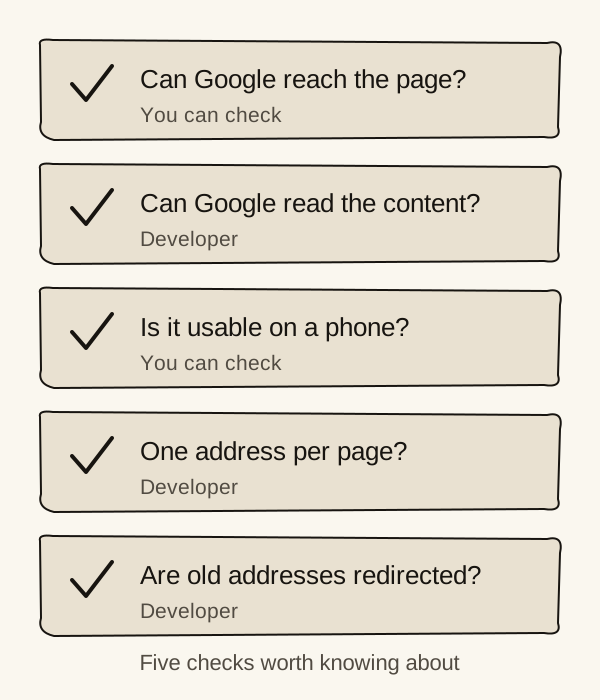
These five follow the checks at the top of this page, and cover most small business websites:
- Can Google reach every important page? Is anything blocked by robots.txt or a noindex tag? Is there a sitemap, and is it submitted in Google Search Console?
- Can Google read the content? Are prices and service details real text on the page, not only in images, PDFs or content that loads after a click?
- How does the site work on a phone, and which pages are slowest?
- Does each page have one address? Does every page load on
https://, with other versions redirecting to it? - Do old page addresses redirect to the right new pages, especially after a rebuild?
Audit tools often produce hundreds of warnings, and most are minor. If a supplier sends you a long technical audit, ask which three issues they’d fix first, and why.
Where should you start?
Start by confirming Google has your most important page, then run one speed test.
- Check your main service page is indexed in Search Console. The task below shows how.
- Run a mobile speed test on your main pages, and fix anything clearly slow.
- Ask your developer the five questions, and keep the answers.
Sources
- Introduction to robots.txtGoogle Search Central · Updated 10 December 2025 · Checked 5 November 2026↩ 1↩ 2
- Learn about sitemapsGoogle Search Central · Updated 10 December 2025 · Checked 5 November 2026↩ 1
- Understand JavaScript SEO basicsGoogle Search Central · Updated 4 March 2026 · Checked 5 November 2026↩ 1↩ 2
- Understanding page experience in Google Search resultsGoogle Search Central · Updated 22 September 2026 · Checked 5 November 2026↩ 1↩ 2
- Block Search indexing with noindexGoogle Search Central · Checked 5 November 2026↩ 1
- How to specify a canonical URL with rel="canonical" and other methodsGoogle Search Central · Checked 5 November 2026↩ 1