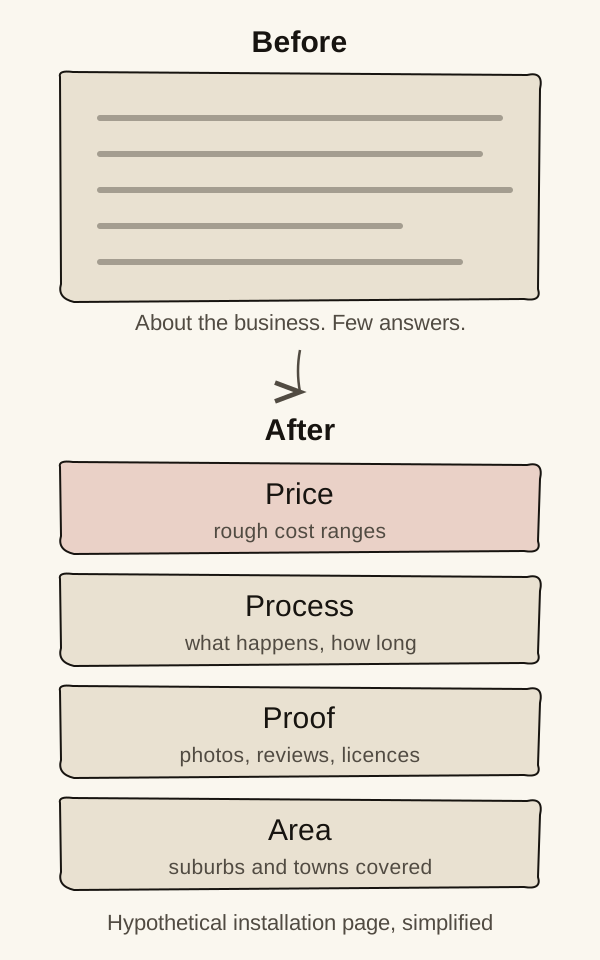
On-page SEO is making each page the most useful answer to the search it targets. For most service pages, that means answering four questions: what it costs, how it works, why you can be trusted, and where you work.
Most service pages are written to describe the business. Searchers arrive with questions. A page that answers them is doing on-page SEO, whether or not anyone calls it that.
What should a service page answer?
A page earns its place by answering what the searcher came to find out.
Google says its ranking systems are built to prioritise helpful, reliable information created to benefit people.Google says[1] For a service page, that usually comes down to four questions:
- Price: roughly what will this cost me?
- Process: what happens, and how long does it take?
- Proof: have you done this before, and did it go well?
- Area: do you work where I live?
Our made-up Hamilton heat pump installer has an installation page that opens with “We’re a family-owned business with over 20 years’ experience”. It’s true, but it answers none of the four questions. The rewrite leads with typical cost ranges, explains a standard installation day, shows photos of real jobs with reviews, and lists the suburbs and towns it covers.
What do people see in Google before they click?
They see your title and a short description, and those decide whether they click. Google may change both if they don’t fit the page.
The clickable headline of a search result is called the title link. Google creates it automatically from several places: your page’s title tag (a line of code that names the page), the main heading, and other prominent text on the page.Google says[2] Google advises against vague titles like “Home”, and against repeating the same text in every title.[2]
The short text underneath is the snippet. Google usually takes it from the page itself, and sometimes from the meta description, a short summary you can write for each page.[3]
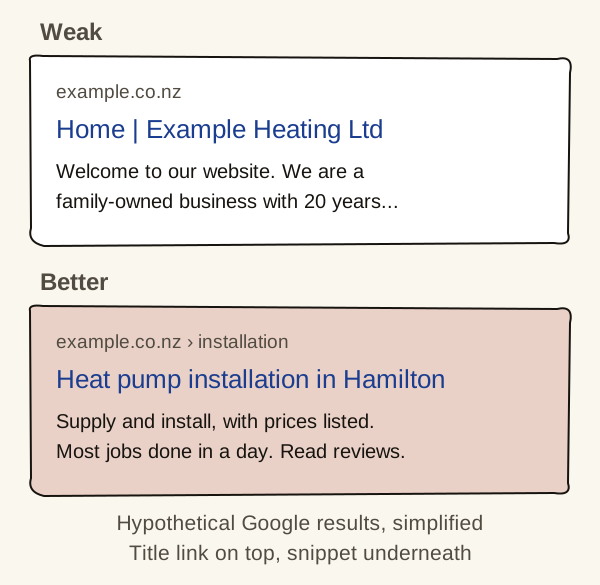
The better version tells a searcher in one glance that they’ve found what they were looking for.
How do you show you can be trusted?
Show real details that prove a capable business stands behind the page.
Google uses a framework called E-E-A-T: experience, expertise, authoritativeness and trust. It says trust is the most important part, and that E-E-A-T isn’t a specific ranking factor in itself.Google says[1] It’s better read as a description of the pages Google’s systems try to reward.
For a trade business, trust looks like:
- licences and memberships, with numbers people can check
- named staff, and photos of real people and real jobs
- reviews, ideally with a link to where they were left
- a physical address, phone number and clear contact details
What do Google's quality raters do?The people who test Google's results, and why their ratings don't rank your website.
Google works with people called quality raters, who are trained to judge whether results seem good, including whether content has strong E-E-A-T. Google describes their feedback as a way to help confirm its changes are working well. It’s also clear that raters have no control over how pages rank, and that rater data isn’t used directly in its ranking algorithms.[1] So the rater guidelines are a useful picture of what Google wants its results to look like. They aren’t a checklist your page is scored against.
Why do thin and copied pages cause problems?
Pages with little original content don’t help searchers, they may count against your whole site, and making them in bulk breaks Google’s rules.
A common example is a set of suburb pages that are identical apart from the suburb name. Another is product information copied word for word from a manufacturer’s website. Google’s spam policies describe scaled content abuse: making many pages mainly to manipulate rankings rather than help people.Google says[4] Google also says it has systems that show original content ahead of pages that only repeat it.[5]
Remember the site quality signal from part 1. Trial evidence describes it as mostly about the site rather than any one search.Court evidence[6] The evidence doesn’t say how much weak pages count towards it. We’d still treat a pile of weak pages as worth fixing, even if nobody visits them.
If our installer had 30 suburb pages that each said “We install heat pumps in [suburb]”, the better move would be one strong installation page listing every area it covers, plus separate pages only where there’s something genuinely different to say.
Should you write for Google or for people?
Write for people. Writing for search engines, with repeated keywords and padding, makes pages worse for readers and no better for Google.
Where should you start?
Start with the page that matters most to your business, usually your main service page.
- Check it answers price, process, proof and area.
- Rewrite its title if it only says your business name or “Home”.
- Add proof that a real, capable business stands behind it.
- Then look at thin pages, especially near-identical suburb pages, and merge or improve them.
Sources
- Creating helpful, reliable, people-first contentGoogle Search Central · Updated 5 October 2026 · Checked 5 November 2026↩ 1↩ 2↩ 3↩ 4
- Influencing your title links in search resultsGoogle Search Central · Updated 10 December 2025 · Checked 5 November 2026↩ 1↩ 2
- SEO Starter GuideGoogle Search Central · Updated 10 December 2025 · Checked 5 November 2026↩ 1
- Spam policies for Google web searchGoogle Search Central · Updated 28 August 2026 · Checked 5 November 2026↩ 1
- A guide to Google Search ranking systemsGoogle Search Central · Updated 10 December 2025 · Checked 5 November 2026↩ 1
- Call notes with Google engineer HJ Kim, 18 February 2025 (trial exhibit PXR0356)US Department of Justice · Checked 5 November 2026↩ 1