AEO stands for answer engine optimisation. It’s work aimed at helping people discover and understand your business through AI-generated answers.
That might mean your business is suggested when someone asks ChatGPT for a supplier. It might mean a Google AI answer uses information from your website to explain a topic. It also means paying attention to whether those answers describe your business correctly.
If you’re new to this, start with a simple question: what would a potential customer need to know before choosing you? That gives you a useful starting point for AEO, without having to understand every detail of how AI works.
How could someone find your business through an AI answer?
Imagine you’re looking for software to help a team in Auckland and Sydney manage projects together. You could ask an AI assistant:
“What project management software would suit our team? We need to share work between offices and get support during our working day.”
For this example, let’s imagine the assistant explains what to look for, suggests three suppliers and includes links to their websites.
You can start comparing those suppliers before opening a single page. If one is described as offering the support you need, you might take a closer look. If another is described incorrectly, you might rule it out for the wrong reason.
Now put yourself in the supplier’s position. You’d want to know whether your business appears, what the answer says about it, and whether that description would help the right customer choose you. Those are the kinds of questions AEO tries to address.
Where do AI answers get their information?
An AI assistant can draw on information it learned during its training. It can also use tools to look up information while answering a question. Looking up a webpage is different from learning from it during training: the assistant can use that page for the current answer without the underlying model being retrained.
ChatGPT can search the web, turn a person’s question into search queries and follow up with further searches. Google’s AI search features can also run related searches to help answer a question. The details vary by product, and not every AI response includes a live web search.[3][1]
For a business, this gives you a practical place to begin: check the information people and search tools can find about you. Does your website explain what you offer? Is it up to date? Can search tools access the pages that matter?
What do crawling and indexing mean?Two terms you may hear when someone checks your website.
A crawler is software that visits webpages. Indexing is the next part of Google’s process: it analyses a page and may store information about it in its search index, the collection it uses to find results.
Google describes crawling, indexing and serving results as separate stages. A visit from its crawler doesn’t guarantee that a page will be indexed, and an indexed page won’t appear in every relevant search.[2]
So if your developer says a search tool can access your site, that’s useful news. It doesn’t yet tell you whether the tool will use your page in an answer. Other platforms have their own requirements, which need to be checked separately.
Is AEO different from SEO?
SEO, or search engine optimisation, helps people find your website through search engines. AEO focuses on how your business and information appear within answers.
There’s a lot of overlap in the work. A page that clearly explains your product can help someone visiting from Google and provide useful information for an AI answer. Google says its established SEO foundations still apply to its AI search features.[1]
AEO also gives you some different things to check. For example, an AI answer might name your business but describe an old service you no longer offer. You’d need to investigate that description, even if your website was already easy to find in search results.
You may also hear GEO, short for generative engine optimisation, or AI search optimisation. These are overlapping names for work in this area. When discussing a proposal, ask what the person will actually do and why it should help your business. The acronym alone won’t tell you that.
What does AEO work involve?
At INCITE, we’d start with the customers your business can help and the questions they need answered. That makes it easier to decide which information deserves attention first.
Take our software example. “We make business software” tells a buyer very little. An explanation of how teams share projects, which other tools the software connects to and when support is available gives them something to judge.
Customer enquiries and conversations with your sales or support team can help you find those questions. If you’re working from assumptions, say so and check them with someone who knows the customers. AI tools can suggest questions too, but a generated list isn’t evidence that people are asking them.
From there, the work usually falls into a few practical areas.
Explain your business clearly
Read your main product or service pages as if you knew nothing about the business. Could you explain what it does, who it’s for and when it would be a good choice?
A phrase such as “flexible solutions for modern teams” doesn’t give a buyer much help. Specific details do: the tasks the software supports, its limitations, its pricing arrangements and the help available when something goes wrong.
Useful content can also explain a difficult decision or bring together information that’s hard to find elsewhere. Google recommends distinctive, valuable content for its AI search features. Its guidance doesn’t prescribe an ideal page length or require you to break everything into tiny sections.[1]
Use a table when it makes a comparison easier. Use a diagram when it helps someone understand an idea. The reason to include either is that it helps the reader, rather than expecting the format itself to earn a place in an AI answer.
Make sure search tools can access the information
Ask whoever manages your website to check whether the relevant search tools can reach your important pages. This is a technical check, but you don’t need to know the code to explain what you want checked.
It’s also worth separating two decisions: letting a tool find your pages for search, and letting a company collect your content for AI training. For ChatGPT, OpenAI provides different crawlers for those jobs, with settings that can be controlled separately.[4]
What should your website team check?A little more detail on search access and training controls.
OpenAI calls its search crawler OAI-SearchBot. Its GPTBot crawler collects content that may be used for training. Your website team should check the rules for each, rather than assume that allowing or blocking one makes the same decision for both.
Google also has a setting in Search Console, its website management tool, for whether a site’s content can be used in its generative AI Search features. The default allows inclusion. Ask your website team to check the setting that applies to your site; it’s a separate decision from allowing AI training.[5]
These are platform-specific checks. Instructions for Google shouldn’t automatically be applied to ChatGPT or another service.
Check that descriptions of your business are accurate
Try a question that names your business, such as “What support does [business name] offer?” This helps you check whether its details are described correctly. A broader question, such as the software-buying question above, checks something different: whether your business comes up when the person hasn’t named it.
If an answer links to a source, open it. You may find an old product page or an outdated description that needs attention. OpenAI warns that search results and citations can be wrong, incomplete or out of date, so the link itself doesn’t prove the answer is correct.[3]
Your business may also appear in directories, industry publications and other websites. Accurate information in those places helps people assess your offer too.
Does a link to your website mean you’re being recommended?
Not necessarily. A link used to support an answer is often called a citation. It tells the reader where some of the information came from.
In our software example, the assistant might link to Supplier A’s article about managing work between offices. It could then suggest Supplier B as a product to consider. Supplier A supplied useful information; Supplier B was presented as a possible choice.
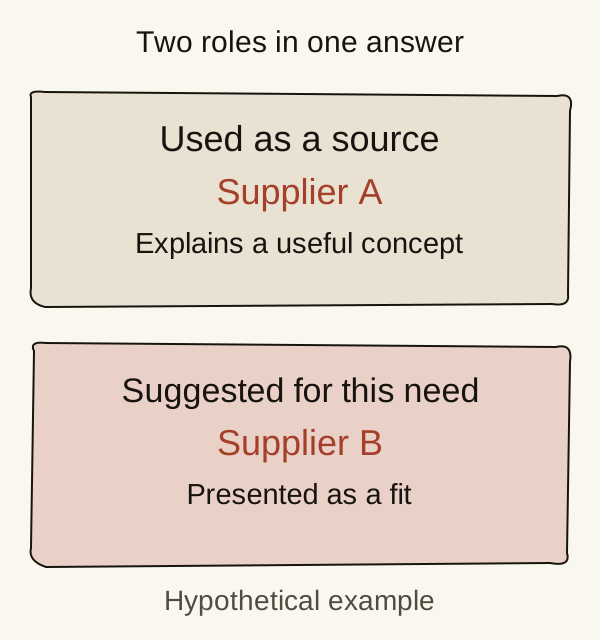
Both could be valuable. A useful explanation may introduce someone to Supplier A, even if it isn’t on the shortlist. But counting the two appearances as the same result would miss an important difference.
When you review an answer, read what it actually says. Is your business simply named? Is your page used as a source? Is the business suggested for a relevant need? And is the description correct? Those questions tell you more than a total number of mentions on its own.
How can you tell whether the work is helping?
Start with the thing you’re trying to improve. If AI answers keep getting your support hours wrong, check whether the hours are described correctly. If you want more people to discover a service, look for relevant mentions and recommendations, then see whether there’s evidence of visits or enquiries.
You can start by saving answers to a small set of customer questions. Record the question, the date, the AI tool and the version or mode you used. That gives you something to compare later.
Be careful about drawing conclusions from a single answer. Research by SparkToro and Gumshoe found that recommendations could vary considerably when questions were repeated. Some brands still appeared regularly, including across different wordings of similar questions. So repeated checks can be informative, but one answer won’t show you everything a customer might see.[8]
A note on the researchWhat this study can help us understand, and where its limits are.
The research used responses submitted by volunteers and a follow-up set of questions about headphones. It was conducted with a company that sells AI visibility tracking. It wasn’t a representative study of business buyers in New Zealand or Australia.
It gives us a reason to be cautious about one-off answers. It doesn’t tell every business how many checks to run, or prove that an automated tracking tool sees exactly what its customers see.
Google and Bing also offer reports about appearances in AI answers. These can help you track particular kinds of visibility, but they don’t measure the same things.[6][7]
What do Google and Bing report?Useful information for whoever looks after your search reporting.
Google’s generative AI performance report covers link impressions in AI Overviews and AI Mode: appearances of links under the report’s counting rules. An impression isn’t a visit to your website.
Bing’s AI Performance report covers citations across supported Microsoft experiences. It also includes a sample of the search phrases used to find supporting information. Those phrases are called grounding queries.
Neither report tells you how many customers the answers won. Read each report’s definitions before comparing its numbers with another tool.
Alongside those checks, look at visits, enquiries and sales where you can. If a new customer says they found you through ChatGPT, that’s useful to know. It won’t explain every influence on their decision. Someone may also discover you in an answer without clicking a link, which means website visit data alone won’t show the whole picture.
Where should you start?
Choose one customer question your website doesn’t answer well yet.
For our software supplier, that might be: “Will we be able to get support while our Auckland and Sydney teams are working?” Suppose its website only says “support across Australia and New Zealand”. That’s too vague to answer the question.
Before changing anything, save what the page says and a few AI answers about the support available. Then confirm the details with the business: opening hours, time zones, which plans include support and any exceptions. Put that explanation on the relevant product page.
Choose a review date when you make the edit. As a manageable starting routine, you could check once a week over the following few weeks, using the same questions in the same AI tool and mode. That’s a suggested way to organise your time, not a deadline by which the answers should change. Does the answer get the details right? Does it link to the updated page? Save what you find. An improved answer doesn’t, by itself, prove your edit caused the change, but checking its sources can help you investigate.
Look across your saved answers rather than treating one change as a trend. You can then decide whether to keep watching, investigate an incorrect source or work on the next customer question.
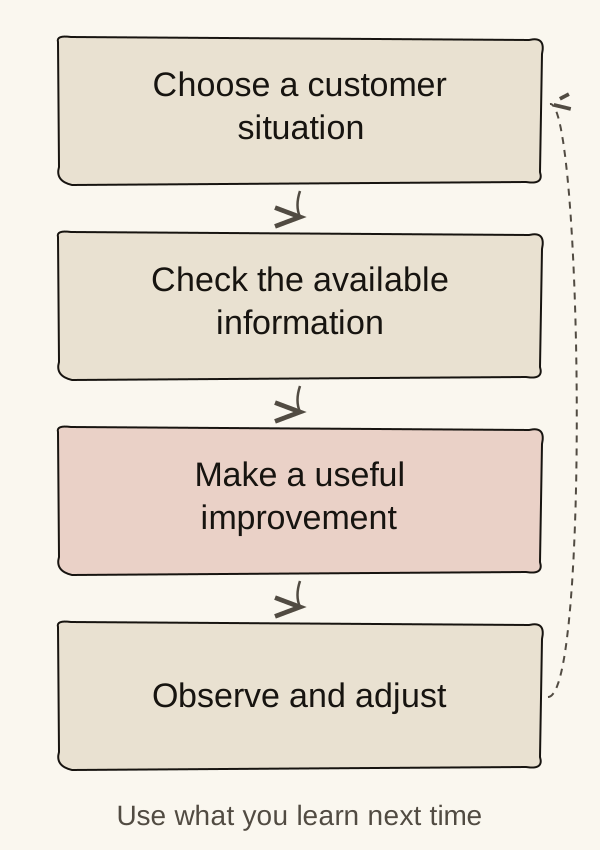
You don’t need to solve every AI search question at once. Start with something your customers need to understand, make that information more useful, and use what you learn to choose the next improvement.
Sources
- Optimising your website for generative AI features in SearchGoogle Search Central · Checked 21 September 2026↩ 1↩ 2↩ 3
- How Google Search worksGoogle Search Central · Checked 21 September 2026↩ 1
- Searching the web with ChatGPTOpenAI · Checked 21 September 2026↩ 1↩ 2
- Overview of OpenAI crawlersOpenAI · Checked 21 September 2026↩ 1
- Search generative AI controlGoogle Search Console Help · Checked 21 September 2026↩ 1
- Generative AI performance reportGoogle Search Console Help · Checked 21 September 2026↩ 1
- Introducing AI Performance in Bing Webmaster ToolsMicrosoft Bing · Published 10 February 2026 · Checked 21 September 2026↩ 1
- Research on consistency in AI brand and product recommendationsSparkToro and Gumshoe · Published 27 January 2026 · Checked 21 September 2026↩ 1